pivotick - v2.0.1
Pivotick
Pivotick is a hackable TypeScript graph visualization library built on top of D3 force simulations. It renders directed or undirected graphs with interactive controls, force simulation, tree layout support, and optional UI elements such as a sidebar, a data table, context menus and tooltips.
It also does the thing it is named for: a pivot fetches more graph from wherever your data lives, stages the results as candidates you triage rather than dropping them on the canvas, and can write back what you keep — with an undo history over everything the canvas holds.
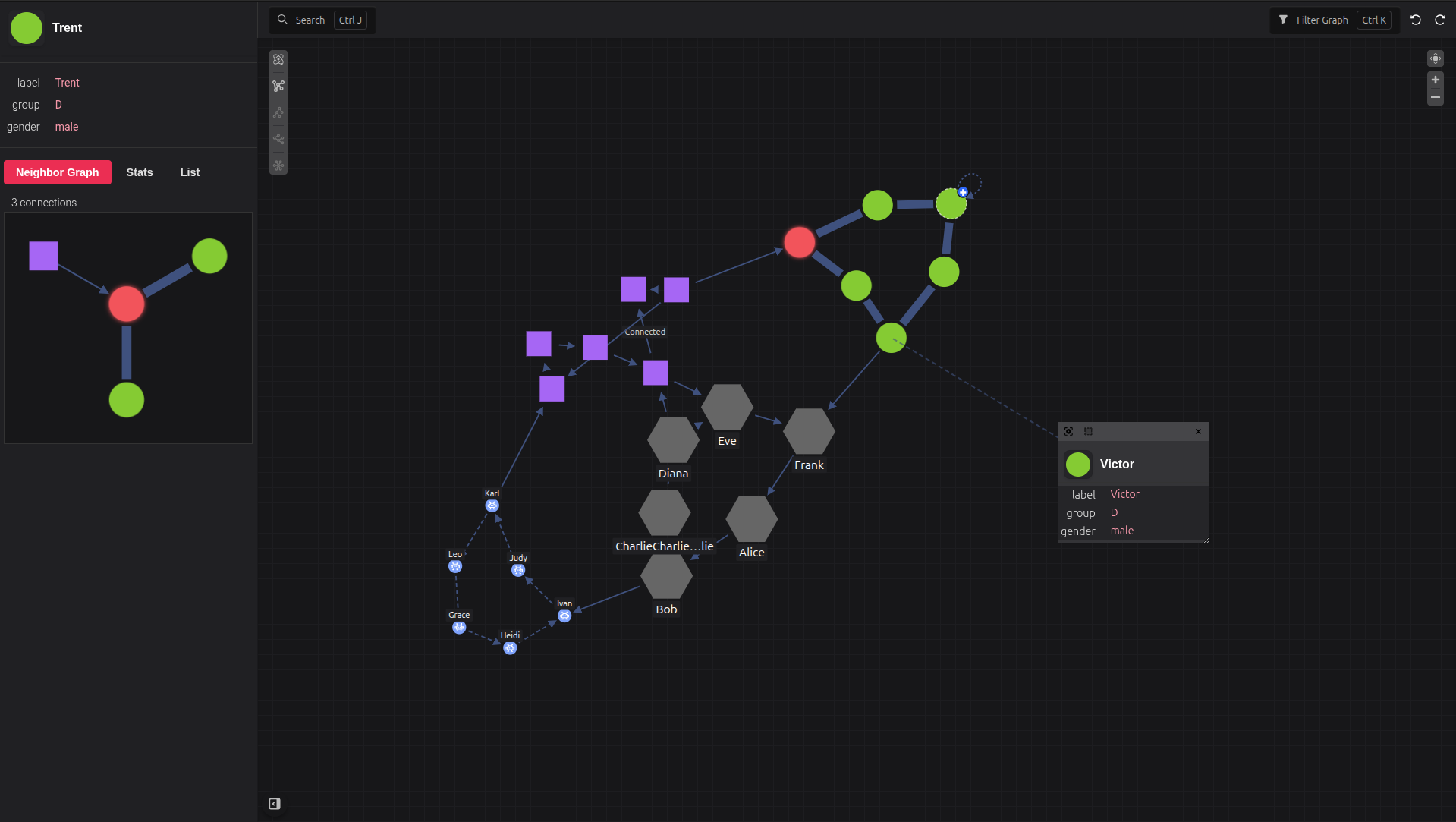
Core Features
- Directed and undirected graph rendering
- Pivots — run an enrichment against what is on the canvas, triage the results in a dock pane, and ingest only what you keep
- Saving a pivot's results back to the system they came from, with a ledger of what has crossed and what has not
- Undo and redo over what the canvas holds — ingests, deletions, hides and hand-drawn elements — as one timeline
- Provenance: every node and edge knows which sources vouch for it, and one source's contribution can be dropped
- Force-based simulation with optional worker support
- Tree/hierarchy layout support, with the hierarchy inferred or declared by the data
- Self-tuning force layout, or hand-tuned from the Physics flyout
- A data table docked under the canvas, sharing one selection with the canvas and the sidebar
- Minimap, a multi-key filtering legend and a declarative filter panel
- Edge layers — edges keyed by kind, styled per kind and switched on and off without moving the graph
- Different UI modes (
full,light,viewer,static) - Configurable node/edge styles, labels, rim badges, and callbacks
- Interactive editing — node editing and edge creation (drag or click) with validation and enrichment hooks
- Extensible plugin API for adding custom UI, including your own mode on the left rail
Getting Started
Basic Usage
Pivotick can be used either as a modern JavaScript module or directly in the browser via a script tag.
import { Pivotick } from 'pivotick'
import 'pivotick/dist/pivotick.css'
new Pivotick({
container: document.getElementById('app'),
data: {
nodes: [
{ id: 1, data: { label: 'A' } },
{ id: 2, data: { label: 'B' } }
],
edges: [
{ from: 1, to: 2 }
]
}
})
Installation
npm install pivotick
1. Use a GitHub Release (no build required)
If you don’t want to build the project yourself, download the latest release from GitHub.
Steps:
- Go to the Releases page of the repository
- Download the latest dist bundle
- Extract it into your project
You should get files like:
pivotick.es.js
pivotick.umd.js
pivotick.iife.js
pivotick.css
Then use them depending on your environment:
ES Module (recommended)
import { Pivotick } from 'pivotick'
import 'pivotick/dist/pivotick.css'
const app = new Pivotick({
container: document.getElementById('app'),
data: {
nodes: [
{ id: 1, data: { label: 'A' } },
{ id: 2, data: { label: 'B' } }
],
edges: [
{ from: 1, to: 2 }
]
}
})
Browser (IIFE / UMD)
<!DOCTYPE html>
<html>
<head>
<link rel="stylesheet" href="/assets/pivotick.css" />
<script src="/assets/pivotick.iife.js"></script>
</head>
<body>
<div id="app"></div>
<script>
const app = new Pivotick({
container: document.getElementById('app'),
data: {
nodes: [
{ id: 1, data: { label: 'A' } },
{ id: 2, data: { label: 'B' } }
],
edges: [
{ from: 1, to: 2 }
]
}
})
</script>
</body>
</html>
2. Build from source (recommended for development)
Use this if you want full control over the library or need to modify it.
git clone https://github.com/pivotick/pivotick.git
cd pivotick
npm install
npm run build
After building, the compiled files will be available in:
dist/
You can then import them directly depending on your environment:
ES Module
import { Pivotick } from './dist/pivotick.es.js'
import './dist/pivotick.css'
Browser build
<script src="./dist/pivotick.iife.js"></script>
Styling
Pivotick comes with default styles included in pivotick.css:
You can customize the look in two ways:
- Use Pivotick's built-in classes.
- Override styles using CSS variables.
:root {
--pvt-node-color: #FDDA24;
--pvt-node-stroke: #000000;
--pvt-edge-stroke: #EF3340;
}
.pvt-node circle {
fill: cyan;
}
Docs & API Reference
- Full documentation: https://pivotick.github.io/Pivotick/
- Typed API reference: https://pivotick.github.io/Pivotick/api/html/classes/Pivotick.html
Project Scripts
npm run dev # Start Vite dev server
npm run build # Build full project (types + all bundles)
npm run build:es # Build ES module bundle
npm run build:browser # Build browser (UMD + IIFE) bundle
npm run build:worker # Build worker bundle
npm run preview # Preview production build
npm run lint # Run ESLint
npm run lint_fix # Fix lint issues
npm run vitepress:dev # Run documentation site locally
npm run vitepress:build # Build documentation site
npm run vitepress:preview # Preview documentation build
npm run typedoc:dev # Watch TypeDoc output
npm run typedoc:build # Generate API docs
npm run docs:build # Build full documentation (typedoc + vitepress)
Contributing
- Create a branch
- Run
npm run buildandnpm run lint - Open a pull request with a concise summary of behavior and API changes
- Keep PRs focused and small